One product.
A business dashboard
and a staff portal.
The business login runs the dashboard. Staff open a lighter portal with their day, bookings, and profile. Everyone works from real availability, not a shared spreadsheet.
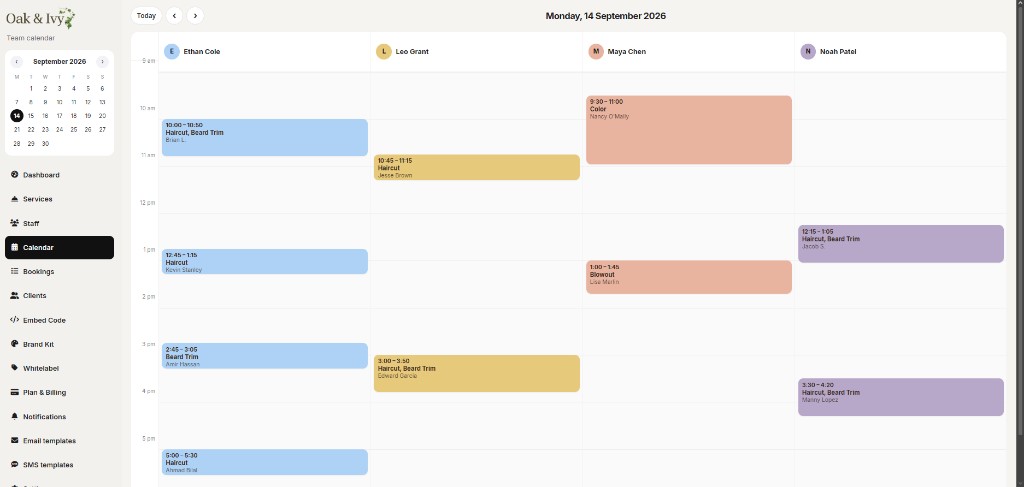
See every chair,
or one person’s day.
The business calendar shows staff side by side with color-coded appointments. Jump to today, move by day, and open a booking for details. Staff can use a personal view that only shows their own schedule.
- Shared team columns in the business dashboard
- Personal “my day” for each staff login
- Hours, time off, and buffers respected in availability
Everything to run booking,
without a bloated OS.
Services & categories
Build the menu clients see: duration, price, categories, and who can perform each service.
Staff & hours
Add team members, set weekly hours, and manage exceptions so online booking stays accurate.
Bookings & clients
List appointments, open details, reschedule, and keep a client history tied to the people who book with you.
Website & embed
Publish the free website or drop a widget on the site you already have.
Brand Kit
Colors, font, and corners for booking pages and widgets. Included on paid plans.
Email Templates
Email templates, notification settings, and logs so you can see what actually sent. SMS wording is set by ML Booking. Learn more.
Built for the person
with scissors in hand.
Staff log in to a focused portal: their appointments, schedule, and profile. Not services, billing, or branding. Those stay in the business dashboard.
- Appointments and booking details
- Personal calendar and schedule
- Profile and notification preferences
Two logins.
That is the whole team.
Each business has a business dashboard and staff accounts. Clients never need an account. They book from your site, widget, or link.
Give the business and staff
the right screen.
Team calendars, staff logins, and a dashboard that stays on booking.
See pricing